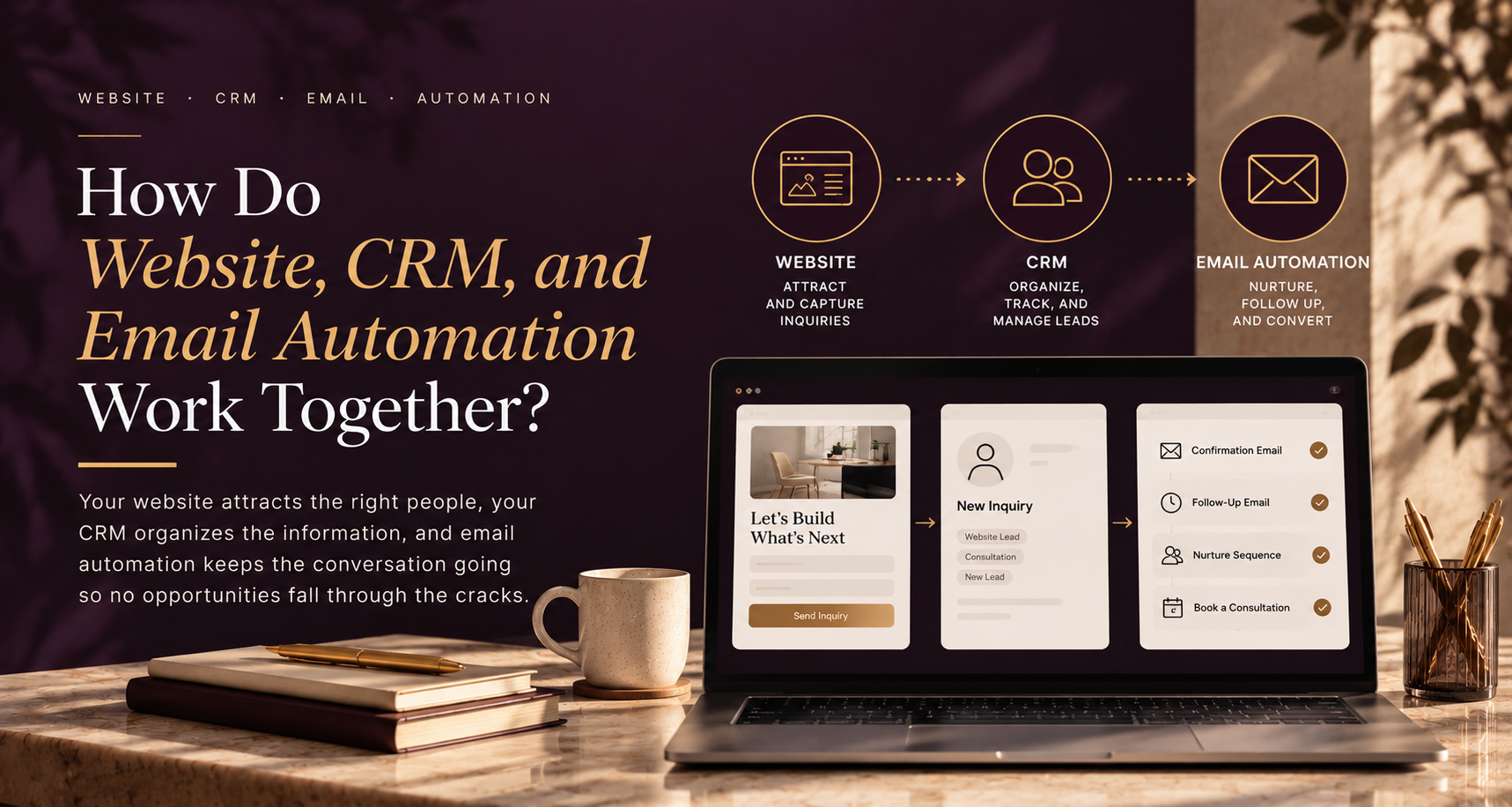
How Do Website, CRM, and Email Automation Work Together?
Your website captures interest, your CRM stores and organizes the lead information, and email automation handles the right follow-up based on what happens next. When all three are connected, a website inquiry can move into your sales process without relying on someone to manually copy information, remember every follow-up, or figure out where the lead belongs.
The website brings the person in.
The CRM remembers who they are and what happened.
Email automation keeps the conversation moving.
The value comes from connecting those three pieces into one client journey.
What does the website actually do?
Your website is usually the first part of the system a potential client sees.
Someone may arrive after finding you through Google, LinkedIn, a referral, an advertisement, or another piece of content.
They are probably trying to answer a few questions:
Can this business help me?
Do they understand the problem I have?
Can I trust them?
What should I do next?
Your website should make those answers easy to find.
When the visitor is ready to take the next step, they might:
- Submit an inquiry
- Book a consultation
- Request a quote
- Download a guide
- Register for something
- Subscribe to your emails
This is where the website starts handing the relationship over to the rest of your marketing system.
The problem is that many businesses stop here.
The form gets submitted.
An email notification arrives.
Then everything depends on someone noticing it, responding, and remembering what to do next.
That is not really a connected system.
What happens when the website connects to the CRM?
Once someone submits a form, their information should ideally move into your CRM automatically.
The CRM can create a new contact or update an existing one.
Depending on your business, you might capture:
- Name
- Email address
- Company
- Phone number
- Service interest
- Form submitted
- Original lead source
- Campaign source
- Lifecycle stage
- Qualification information
- Notes or specific questions
Now the information is not sitting inside someone’s inbox.
It becomes part of the client’s history.
This is important because your CRM should help answer questions such as:
Where did this person come from?
What are they interested in?
Has anyone contacted them?
Have they booked a call?
What emails have they received?
Are they still a lead or already a client?
That context is what makes the next part of the process more useful.
Where does email automation fit?
Once the CRM knows what happened, email automation can respond.
For example, someone submits an inquiry through your website.
The CRM creates the contact.
The system recognizes that they are a new lead.
That can automatically trigger an email saying:
Thanks for reaching out. We’ve received your inquiry, and here’s what you can expect next.
Simple.
But useful.
The person knows their inquiry went through.
They know what will happen next.
And your team does not have to manually send the same confirmation every time.
That is the simplest example.
As the relationship develops, email automation can support other stages too.
It might handle:
- Inquiry confirmations
- Consultation reminders
- Lead nurture
- Proposal follow-up
- Client onboarding
- Educational emails
- Re-engagement
- Renewal reminders
- Referral requests
The important part is that these emails should respond to what is happening in the relationship.
Automation becomes much more useful when it is connected to CRM data.
What does a connected website, CRM, and email automation system look like?
Let’s take a normal professional services inquiry.
A potential client lands on a service page and decides to contact you.
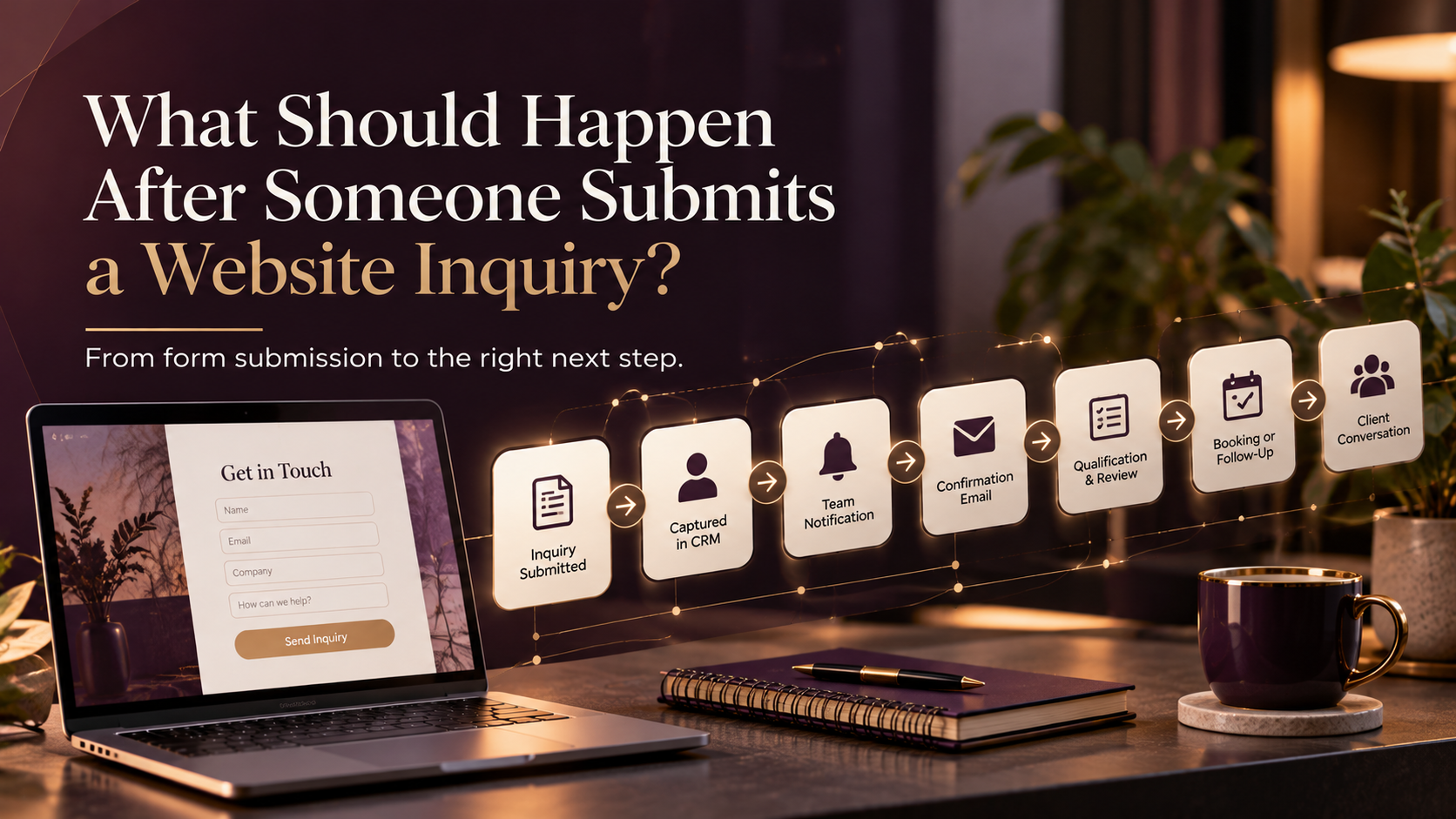
The process could look like this:
Website inquiry submitted
↓
CRM creates or updates the contact
↓
Lead source is recorded
↓
Service interest is recorded
↓
Team receives an internal notification
↓
Prospect receives confirmation
↓
Opportunity or follow-up task is created
↓
Prospect books a consultation
↓
CRM stage changes
↓
Generic nurture stops
↓
Sales conversation begins
↓
Lead becomes a client
↓
Client onboarding begins
Nothing about that needs to feel complicated to the prospect.
They simply experience a business that seems organized.
Behind the scenes, the systems are making sure the right information and tasks move with them.
Why shouldn’t the website just send an email notification?
An email notification can work when a business receives very few inquiries.
But it becomes unreliable as the business grows.
Imagine a form submission arrives in an inbox.
Someone reads it.
They intend to respond later.
Another email arrives.
A meeting starts.
The day gets busy.
Two days later, nobody remembers whether the inquiry was handled.
Even if someone does respond, the information may still only exist inside that email thread.
Now someone else on the team has to ask:
Did we follow this lead up?
Where did they come from?
What service were they interested in?
Did they already book?
Are they in the CRM?
Connecting the website directly to the CRM removes some of that uncertainty.
It gives the inquiry a proper place to live.
Why does the CRM need to control the automation?
Because the CRM knows when the relationship changes.
Suppose someone enters your nurture sequence after downloading a guide.
A few days later, they book a consultation.
If the nurture system does not know that, the person might still receive an email saying:
Ready to book a call?
They already did.
Then they have the consultation.
The team sends a proposal.
Another automated email arrives telling them to learn more about your basic service.
The communication becomes disconnected very quickly.
A better setup uses CRM information to change the automation.
For example:
If consultation booked → stop booking reminders.
If active sales conversation → pause generic nurture.
If client → remove from prospect journey and start onboarding.
If opportunity is lost → move to an appropriate long-term nurture, if relevant.
This is where lifecycle marketing becomes much more useful than a basic drip campaign.
The system is responding to the relationship instead of blindly sending Email 1, Email 2, Email 3.
What should happen after someone submits a website inquiry?
At minimum, I would usually want five things to happen.
1. Capture the contact in the CRM
Do not rely on the form notification as the main record.
Create or update the contact automatically.
2. Record why they contacted you
If they selected a service or completed qualification questions, keep that information attached to the CRM record.
3. Notify the right person
The person responsible for the next step should know there is a new inquiry.
That notification should contain enough information to understand the lead without having to search for it.
4. Confirm the inquiry with the prospect
Let them know you received their message.
Tell them what happens next.
5. Create the next action
That could be:
- A task for the team
- A discovery call
- A qualification step
- A follow-up email
- A nurture journey
The inquiry itself should trigger a process.
It should not become another item sitting in someone’s inbox.
What information should pass from the website to the CRM?
You do not need to collect everything you could possibly know about a lead.
You need the information that helps you provide the right next step.
For many professional service businesses, useful information might include:
Contact details
Name, email, company, and phone number when needed.
Service interest
Which service are they asking about?
This can help with routing, segmentation, and future emails.
Lead source
Did they come from Google?
LinkedIn?
A referral?
A campaign?
Knowing where good inquiries come from helps you understand which marketing is actually creating opportunities.
Qualification information
This will vary by business.
You might ask about timeline, company size, current setup, budget range, or the problem they are trying to solve.
Don’t turn your inquiry form into an interrogation.
Collect what you actually plan to use.
How can email automation improve lead follow-up?
One useful thing about automation is that it protects the follow-up process when people are busy.
For example:
A lead submits an inquiry.
They receive confirmation immediately.
Someone from the team follows up personally.
But the lead does not respond.
Instead of leaving the opportunity there forever, the CRM can create a reminder.
If appropriate, an automated follow-up might go out later.
If the lead still does not respond, they could enter a lower-frequency nurture journey.
This does not mean you should chase every lead with ten emails.
It means you have a process.
There is a difference.
Good follow-up automation should make the experience more useful, not more annoying.
Where should human follow-up stay?
Automation should support professional relationships.
Not replace them.
Professional services involve judgment, trust, expertise, and conversation.
Your system can send:
We received your inquiry.
But a person should usually respond to:
Here’s the complicated situation we’re dealing with.
Automation can create a task.
A person still needs to decide how to handle the opportunity.
Automation can send onboarding instructions.
A consultant, advisor, accountant, or service provider still needs to deliver the expertise.
I think this is an important distinction.
The goal is not to remove people from the process.
It is to remove unnecessary repetitive work around the people.
Can the same system support client onboarding?
Yes.
This is one of the reasons connecting the CRM to automation becomes valuable beyond lead generation.
When the CRM changes someone’s status from prospect to client, that can trigger a completely different journey.
For example:
Deal marked as won
↓
Lifecycle stage changes to Client
↓
Welcome email sent
↓
Onboarding form sent
↓
Internal onboarding tasks created
↓
Project team notified
↓
Kickoff booking link sent
↓
Client receives next-step resources
Now the client does not have to wonder:
What happens after I say yes?
The system helps make the transition from prospect to client feel intentional.
Do you need separate tools for the website, CRM, and email?
Not necessarily.
Some businesses use several connected platforms.
Others use one platform for most of the process.
HubSpot, ActiveCampaign, GoHighLevel, and other systems can combine different parts of CRM, email, forms, pipelines, booking, and automation.
But I would not start by asking:
Which tool has the most features?
Start with:
What should happen when someone becomes a lead?
What information do we need?
Who needs to act?
What should be automated?
When should a person step in?
Once that process is clear, choosing or configuring the technology becomes much easier.
What should a small business automate first?
If your website, CRM, and email marketing are currently disconnected, I would start very close to the point of inquiry.
Build this first:
Website form
↓
CRM contact
↓
Internal notification
↓
Confirmation email
↓
Follow-up task
↓
Sales or nurture path
Get that working reliably.
Then build the next stage.
Maybe that is:
- Lead nurturing
- Proposal follow-up
- Client onboarding
- Re-engagement
- Referral automation
Trying to automate the entire client lifecycle immediately usually creates more complexity than necessary.
Build one useful journey.
Learn from it.
Then improve the next one.
How do you know your current systems are disconnected?
Some signs are easy to recognize.
You may have a disconnected setup if:
- Leads are manually copied into the CRM
- Form submissions mostly live in inboxes
- Team members keep separate spreadsheets
- Lead source data is missing
- Nobody is sure who followed up
- Marketing does not know when someone becomes a client
- Sales cannot see which emails a prospect already received
- Existing clients continue receiving prospect messages
- Onboarding has to be rebuilt manually every time
- The same information has to be entered into several systems
Having more software does not solve these problems automatically.
In some cases, it creates more of them.
The goal is not to collect tools.
The goal is to make information move correctly.
What does a good connected system feel like?
From the customer’s side, it should feel almost boring.
They submit an inquiry.
They receive confirmation.
Someone follows up.
The person they speak with already understands what they asked about.
They do not keep receiving irrelevant emails.
If they become a client, the next step is clear.
They are not asked to repeatedly provide information the business already has.
That is what a good system looks like from the outside.
Behind the scenes, your website, CRM, email automation, and team may be doing several things.
The customer does not need to know that.
They just experience continuity.
Your website should start the client journey, not end it
A good website can create interest.
It can build trust.
It can generate an inquiry.
But what happens afterward often determines whether that opportunity turns into a conversation or quietly disappears.
That is why I don’t see website strategy, CRM automation, and email marketing as completely separate things.
The website captures the opportunity.
The CRM keeps the context.
Email automation handles predictable communication.
And your team provides the human expertise.
When those pieces support each other, you get more than a collection of marketing tools.
You get a client journey.
Need help connecting the pieces?
If your website is generating inquiries but everything afterward still depends on manual emails, spreadsheets, or someone remembering the next step, you may not need another tool.
You may simply need a clearer system.
At Marvz Solutions, I help professional service and small B2B businesses connect their websites, CRM, email marketing, and automation so the journey from inquiry to client is easier to manage.
Frequently Asked Questions
A website captures a visitor’s action, the CRM stores and organizes the information, and email automation sends relevant communication based on what the person did and where they are in the customer journey.
In most cases, yes. A direct connection can reduce manual data entry, preserve lead-source information, trigger follow-up, and create a more reliable record of each inquiry.
Common steps include creating or updating the contact in the CRM, recording the source and service interest, notifying the appropriate team member, sending a confirmation email, and creating the next follow-up action.
A CRM stores and organizes relationship data, while email automation uses data and triggers to send communication or initiate actions automatically. The two work best when CRM changes can control who enters or leaves an email journey.
No. It should support sales follow-up by handling routine communication, reminders, and administrative tasks. Important qualification, consultation, and sales conversations still benefit from human interaction.
Not necessarily. Those are examples of platforms that can support different parts of the process, but the right setup depends on your business. Define the journey first, then choose tools that can support it.
Start with the process immediately after a new inquiry: CRM capture, team notification, prospect confirmation, follow-up task, and routing into the appropriate sales or nurture journey.