What Should Happen After Someone Submits a Website Inquiry?
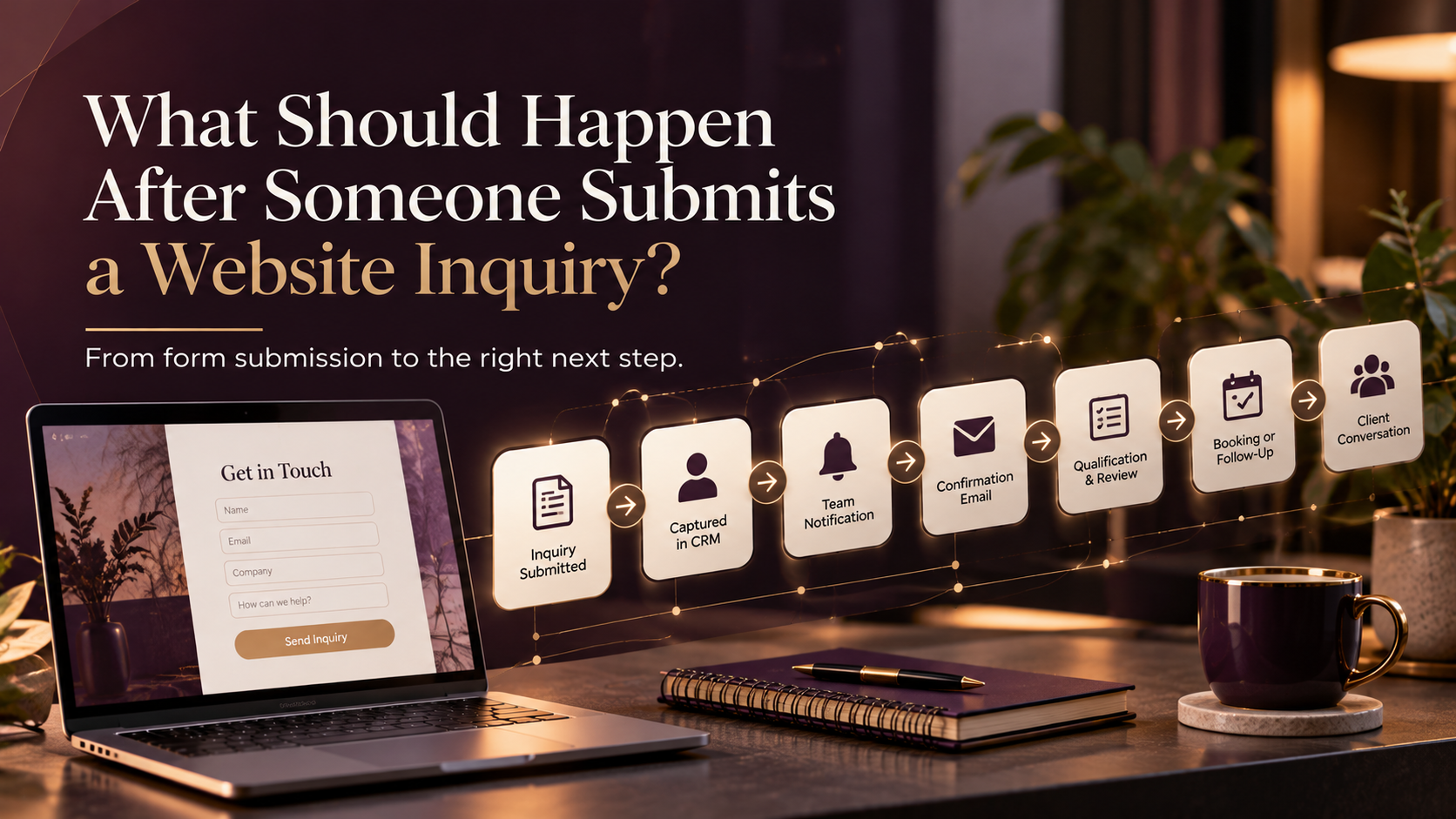
After someone submits a website inquiry, the contact should be captured in your CRM, the right person should be notified, the prospect should receive confirmation, and the next step should be clear. Depending on the business, that next step may include qualification, booking, personal follow-up, or a nurture sequence if the prospect is interested but not ready yet.
The form submission is not the end of the customer journey.
It is the point where your website hands the relationship to the rest of your business.
And this is where a lot of good leads quietly get lost.
A business can have a professional website, strong services, useful content, and a clear contact form.
Then someone submits an inquiry.
The notification arrives in an inbox.
Someone plans to reply later.
The day gets busy.
Two days pass.
By the time the prospect hears back, they may already be talking to another provider.
That is not necessarily a website problem.
It is often a post-inquiry process problem.
What should happen immediately after a website inquiry?
For most professional service and B2B businesses, I would want five things to happen almost immediately:
- The contact is created or updated in the CRM.
- The inquiry source and service interest are recorded.
- The right person or team is notified.
- The prospect receives confirmation.
- A clear next action is created.
None of these steps is particularly complicated.
But together, they remove a lot of uncertainty.
1. Capture the inquiry in your CRM
A form notification sitting in someone’s inbox should not be the only record of a lead.
Your CRM should ideally capture enough information to understand what happened.
That might include:
- Name
- Business email
- Company
- Phone number
- Website
- Service interest
- Form submitted
- Original lead source
- Inquiry date
- Qualification answers
- Main challenge or message
You do not need to collect everything possible.
You need enough context to make the next step easier.
If the person is already in your CRM, the system should normally update the existing contact rather than creating another record.
That gives you a more complete history of the relationship.
2. Record where the inquiry came from
This is something I would preserve as early as possible.
Can you tell whether the person came from:
- A referral
- An email
- Paid advertising
- A specific service page
- A campaign or assessment
This information becomes much more useful later when you’re trying to understand which marketing efforts are producing actual opportunities.
For example:
Lead source: Organic Search
Service interest: CRM Automation
Landing page: Automation service page
Inquiry type: Discovery Call
That gives the business more context than simply knowing another contact form was submitted.
Perfect attribution is difficult.
But preserving useful source information is much better than losing it completely.
3. Notify the right person
A qualified inquiry should not depend on someone remembering to check the website inbox.
Notify the person responsible for the next action.
And make the notification useful.
Instead of:
New form submission received.
Give them something closer to:
New CRM Automation inquiry
Company: ABC Consulting
Contact: Sarah Jones
Challenge: Manual lead follow-up
Timeline: Within 3 months
Current CRM: HubSpot
That lets the person understand the opportunity without searching through several systems.
Depending on your setup, the notification might go to:
- Slack
- Microsoft Teams
- Discord
- The CRM
- A task management system
The tool matters less than making sure someone clearly owns the next step.
4. Confirm the inquiry with the prospect
The person should know their submission worked.
A simple confirmation email is often enough.
It does not need to immediately sell them something.
It can simply explain:
- We received your inquiry.
- Here is what happens next.
- Here is when you can expect a response.
- Here is who you will hear from.
- Here is an optional next step if you are ready now.
For example:
Thanks for reaching out. I received your inquiry about CRM automation and will review the details you shared. You can expect a response within one business day. If you’d rather choose a time directly, you can book a discovery call here.
Clear.
Useful.
No unnecessary pressure.
The person no longer has to wonder whether their form disappeared into the internet.
5. Create the next action
Every inquiry needs an owner and a next step.
That might mean:
Create a follow-up task.
Send the lead for qualification.
Offer a booking calendar.
Ask for additional information.
Add an appropriate lead to nurture.
The important part is that the next step should not live only in someone’s memory.
If a person needs to follow up, create the task.
If someone needs to review the inquiry, assign it.
If the prospect has already booked, update the CRM accordingly.
A good CRM should make it easy to answer:
What needs to happen next with this person?
Should every website inquiry follow the same process?
No.
A contact form submission tells you that someone took an action.
It does not mean every person has the same level of intent.
Compare these three examples:
I’d like pricing for a website modernization project.
Can you send me more information about your services?
I’d like to receive your newsletter.
All three may create contacts.
They should not automatically enter the same sales journey.
This is where basic qualification and routing become useful.
How should you qualify website inquiries?
Qualification does not mean turning your inquiry form into a 25-question application.
You only need enough information to determine the most appropriate next step.
Depending on your service, that might include:
- Service needed
- Business type
- Company size
- Current platform
- Main problem
- Timeline
- Approximate budget
- Location
- Whether the person is involved in the decision
Some information can be collected through the form.
Other information may be better discussed during a discovery call.
The goal is not to make people prove that they deserve to contact you.
It is to help your business handle the inquiry properly.
What happens when the lead is qualified?
If the inquiry looks like a good fit and the timing makes sense, make the next step easy.
For many professional service businesses, that might mean a discovery call.
Your CRM could:
Update lifecycle stage → Qualified Lead
Create opportunity → New Inquiry
Assign owner
Send booking option
Notify the owner
Track whether the meeting is booked
Then, when the prospect books:
Opportunity → Discovery Booked
Now your system knows something changed.
That should also affect the marketing automation around the contact.
They probably do not need another email asking them to schedule their first call.
What happens when the lead is interested but not ready?
This is one of the easiest opportunities to lose.
A prospect says:
This looks interesting, but probably not until next quarter.
Someone replies:
No problem. Feel free to reach out when you’re ready.
Then the conversation disappears.
Three months later, nobody remembers.
Instead, your CRM can retain the context.
For example:
Status: Nurture
Service interest: Website Modernization
Timeline: 3–6 months
Now the business can stay useful without constantly asking the person to buy.
You might send:
- A practical guide
- An article answering a common concern
- A project preparation checklist
- An example of how the process works
- A relevant case study
- A reminder closer to their stated timeline
That is much more useful than sending:
Just checking in again.
every two weeks.
What if the inquiry is not a fit?
Not every inquiry needs to become an opportunity.
Maybe the service is outside your scope.
Maybe the budget is not realistic.
Maybe you do not serve the location.
Maybe it is spam.
The CRM should still record the outcome.
For example:
Closed – Not a Fit
with a reason:
- Budget
- Service mismatch
- Geography
- Timing
- Duplicate
- Spam
- Other
That information becomes useful later.
If your website generates 40 inquiries every month but 25 are completely outside your ideal client profile, you may have a targeting or positioning problem.
Without recording why those leads were closed, you only see:
40 leads.
That does not tell the full story.
How quickly should you respond?
There is no single response-time rule that fits every professional service business.
But your prospect should know what to expect.
If your website promises:
We’ll respond within one business day
your process should help you consistently meet that expectation.
If an immediate personal response is unrealistic, automate the confirmation.
Then give your team an internal service level.
For example:
New inquiry → review within four business hours
or:
New inquiry → personal response within one business day
Consistency is more important than making a promise your team cannot maintain.
What happens when nobody follows up?
This is where automation can protect the process.
Imagine an inquiry enters your CRM.
A follow-up task is created.
One business day passes.
There is still no activity.
Your CRM can:
Notify the owner again.
Then, if necessary:
Escalate the task.
That does not replace the salesperson.
It prevents a good lead from disappearing because everyone became busy.
How should email automation respond?
Email automation should change as the relationship changes.
For example:
New inquiry
Send confirmation.
Discovery booked
Send booking confirmation and preparation information.
Qualified but not ready
Send relevant nurture.
Proposal sent
Pause broad promotional nurture if it would conflict with the sales conversation.
Client
Remove from prospect communication and begin onboarding.
That is much better than putting every website inquiry into the same five-email sequence.
Your CRM should help email automation understand what stage the person is actually in.
What should stop when Sales takes over?
This is one of the most important automation rules.
Imagine:
A prospect submits an inquiry.
They enter your lead nurture.
The next day, Sales speaks with them.
A few days later, they receive a proposal.
Meanwhile, the original nurture sequence sends:
Ready to speak with our team? Book your first discovery call.
Technically, the automation worked.
Strategically, it failed.
Your workflows need exit conditions.
You might remove someone from generic nurture when they:
- Book a discovery call
- Reply to Sales
- Enter an active opportunity
- Receive a proposal
- Become a client
- Unsubscribe
- Become disqualified
Automation should know when its job is finished.
A simple website inquiry workflow
A small professional service firm might use:
Website inquiry submitted → Create/update CRM contact → Record source + service interest
↓
Send confirmation ← Notify team ← Create opportunity
↓
Create follow-up task → Qualification check → Discovery booked
↓
Proposal ← Sales conversation ← Pause generic nurture
↓
Won → Client onboarding → Active client journey
This gives the process a more natural automation-map feel instead of presenting it as one long vertical checklist.
This does not require an enormous automation system.
It requires a clear process.
What should you measure after the inquiry?
Form submissions are only the beginning.
I would also pay attention to:
- Qualified inquiries
- Lead-response time
- Discovery booking rate
- Inquiry-to-opportunity rate
- Opportunity-to-client rate
- Lead sources
- Service interests
- Lost reasons
- Time between inquiry and first meaningful conversation
Those numbers tell you much more than:
We received 47 contact forms this month.
The real question is:
Did those inquiries become useful opportunities?
The website inquiry is where marketing becomes operations
Before the form submission, the focus is usually marketing.
SEO.
Content.
Messaging.
Website design.
Calls to action.
After the form submission, you need operations.
CRM.
Ownership.
Qualification.
Follow-up.
Sales.
Automation.
That handoff is where many customer journeys break.
A strong website should not simply generate inquiries.
It should feed them into a system that knows what to do next.
Need to improve what happens after the form?
If your website is generating inquiries but everything afterward still depends on inboxes, spreadsheets, and someone remembering what to do next, you may not need more traffic.
You may need a better post-inquiry journey.
At Marvz Solutions, I help small B2B and professional service businesses connect their website, CRM, follow-up, automation, and sales process so good opportunities are less likely to fall through the gaps.
Frequently Asked Questions
What should happen immediately after someone submits a website inquiry?
The contact should be created or updated in the CRM, the source and inquiry details should be recorded, the appropriate person should be notified, the prospect should receive confirmation, and a follow-up action should be assigned.
Should every website inquiry enter a nurture sequence?
No. High-intent inquiries may need direct sales follow-up, while good-fit prospects who are not ready yet may benefit from nurture. Existing customers, spam, and unsuitable inquiries need different handling.
Should website forms connect directly to a CRM?
For most B2B businesses, yes. It reduces manual entry and makes it easier to preserve lead information, route inquiries, and track what happens afterward.
What happens when someone submits a form but does not book?
If the inquiry is relevant, create a follow-up task. Depending on the person’s interest and timing, they may also enter a relevant nurture process.
What should stop when Sales starts speaking with the lead?
Generic booking reminders and broad prospect nurture should normally pause or change once a meaningful sales conversation begins.