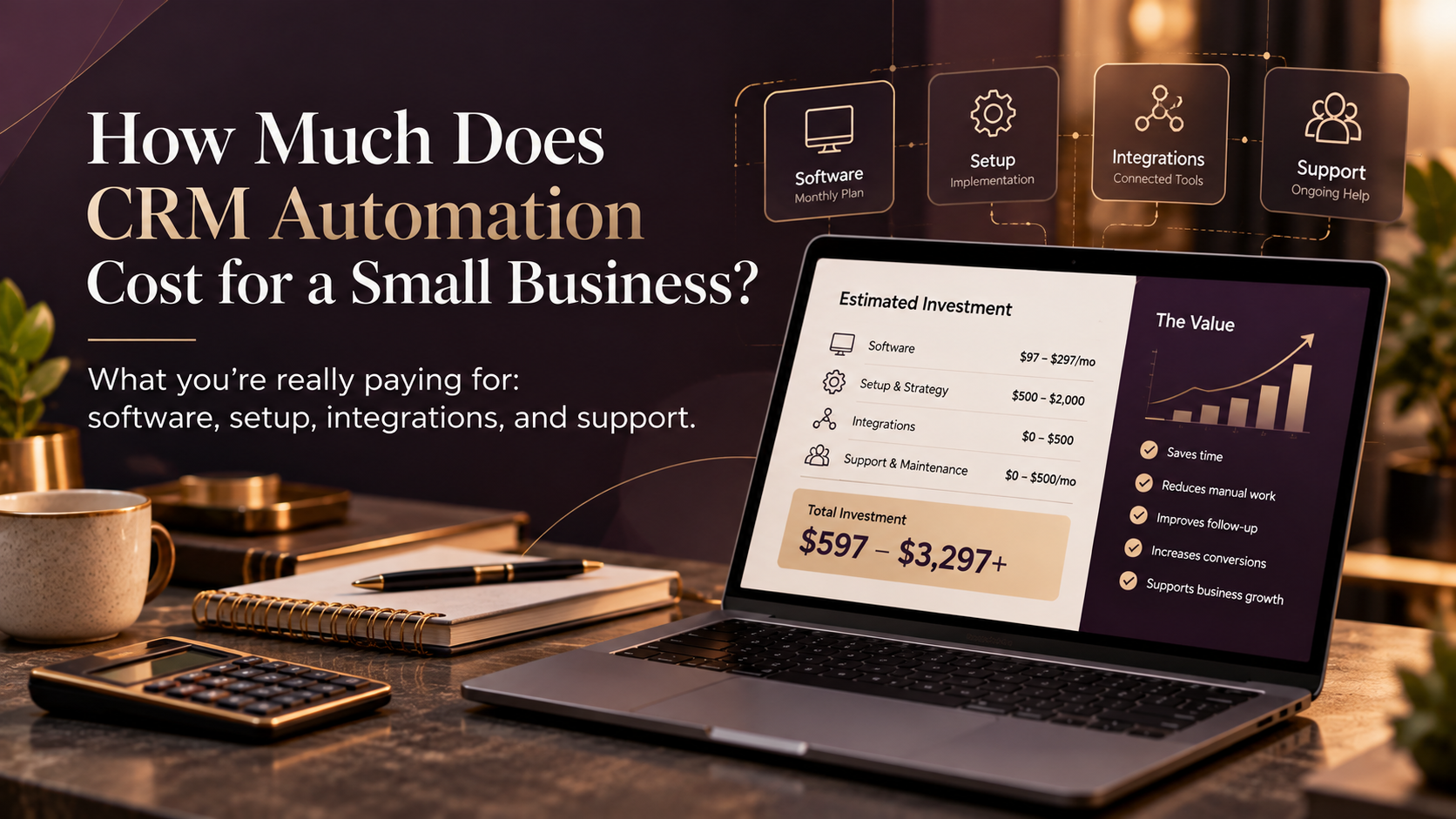
CRM automation for a small business can range from a relatively affordable monthly software subscription to several thousand dollars for a more connected implementation. The total cost usually depends on the software you use, the amount of strategy and implementation required, and how many systems or customer processes need to work together.
The better question isn’t only:
How much does CRM automation cost?
It’s:
What exactly are we trying to automate?
There is a big difference between sending an automatic confirmation after an inquiry and connecting your website, CRM, email, calendar, pipeline, client onboarding, and reporting.
Both are automation.
They should not cost the same.
What are you actually paying for?
A CRM automation project usually includes some combination of:
Software
Your CRM, marketing automation platform, integration tools, email, SMS, and other apps.
Strategy
Deciding what should happen, when, and why.
Implementation
Building fields, pipelines, workflows, automation, and templates.
Integrations
Connecting your website, CRM, calendar, project tools, accounting platform, or other systems.
Data work
Cleaning, importing, or restructuring contacts and CRM data.
Testing
Making sure the customer journey actually works from beginning to end.
Ongoing support
Fixing issues and improving the system as the business changes.
How much does the CRM software cost?
Different CRMs use very different pricing structures.
Some charge primarily by user.
Some by marketing contacts.
Others bundle CRM, email, calendars, funnels, pipelines, and automation.
The cheapest advertised subscription is not necessarily the cheapest system for your business.
If you’re considering GoHighLevel for CRM and automation, you can review the current plans and pricing below:
Affiliate disclosure: If you purchase through this link, I may receive a commission at no additional cost to you.
The right platform depends on what you actually need the system to do.
What does a basic CRM automation setup look like?
A focused setup might only need:
- CRM configuration
- Contact properties
- Basic pipeline
- Website-form connection
- Confirmation email
- Team notification
- Follow-up task
- Testing
That is very different from automating the complete client journey.
What makes automation more expensive?
Complexity usually increases when you add:
- More workflows
- More conditions
- More integrations
- More services or departments
- More customer journeys
- Data migration
- Custom APIs
- Advanced reporting
For example, compare this:
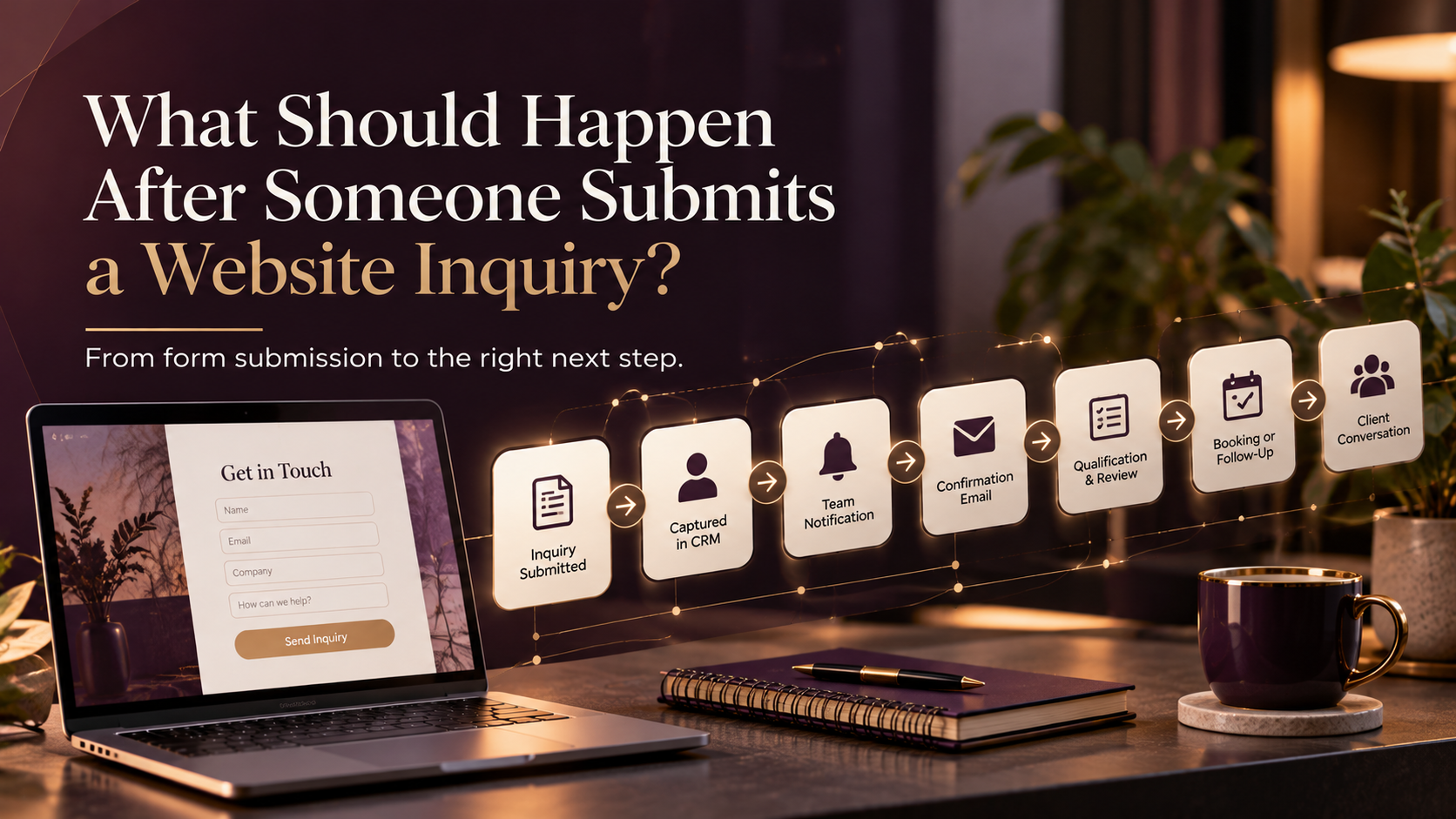
Form submitted → Send confirmation
with this:
Form submitted → Check contact → Record source → Identify service → Qualify lead → Assign owner → Create opportunity → Trigger nurture → Stop nurture if booked → Notify team → Start onboarding if won
The second system requires much more planning and testing.
A simple CRM automation investment map
The cost usually builds in layers:
CRM software → Setup & strategy → Core workflows
↓
Ongoing support ← Integrations ← Data cleanup / migration
↓
Testing → Documentation → Optimization
This is a better way to think about CRM automation than looking only at the monthly software subscription.
What about data cleanup?
Imagine you’ve been using your CRM for three years.
You now have:
- Duplicate contacts
- Old tags
- Inconsistent lifecycle stages
- Missing lead sources
- Old workflows
- Unsubscribed contacts
- Imported spreadsheets
- Fields nobody remembers creating
Building new automation on top of that structure can make the system worse.
Sometimes the first automation project is really a cleanup project.
And that is okay.
Does migration increase the cost?
Yes.
Migration may include:
- Contacts
- Companies
- Opportunities
- Notes
- Custom fields
- Marketing preferences
- Deal history
- Tags
- Lists
Not everything needs to move.
Moving every piece of historical clutter into a new CRM usually does not improve the business.
What do integrations add?
Some integrations are native.
Others may need:
- n8n
- Make
- Zapier
- Webhooks
- API work
The more systems involved, the more questions need answering.
Which system is the source of truth?
What information moves?
Which direction does it move?
How do you prevent duplicates?
What happens if an integration fails?
These decisions affect implementation cost.
What other monthly costs should you check?
Depending on the platform, you may also pay for:
- Marketing contacts
- Email volume
- SMS
- Phone calls
- Phone numbers
- AI features
- Additional users
- Integration tools
- Premium automation actions
Compare the expected real-world cost, not only the headline plan.
What does Marvz Solutions charge?
For a more focused automation foundation:
Automation Foundation starts at $899.
For businesses that need a broader connected system:
Client Journey System starts at $2,499.
The exact project depends on what already exists and what needs to be connected.
The goal is not to build the largest system possible.
It is to build enough system to solve the actual business problem.
What should a CRM automation quote include?
Look for clarity around:
Process mapping
Will someone help define the process first?
CRM setup
Are fields, stages, properties, and pipelines included?
Workflow build
Which workflows are actually being created?
Integrations
What systems are being connected?
Data
Is cleanup or migration included?
Testing
Will the journey be tested from beginning to end?
Documentation
Will you understand how the system works afterward?
Support
What happens after launch?
Comparing only the price can be misleading if the scopes are completely different.
When does CRM automation become worth it?
Look at repeated manual work.
Suppose every inquiry requires someone to:
- Copy information
- Send confirmation
- Create a task
- Assign an owner
- Update the CRM
- Follow up
- Update the pipeline later
That is exactly the kind of process automation can help.
But the value is not only time saved.
It can also reduce missed leads, improve response consistency, improve reporting, and create a better customer experience.
When should you not automate?
Avoid automating simply because you can.
Automation may not be worth it when:
- The task rarely happens
- The process changes constantly
- Every case requires judgment
- Nobody agrees on the process
- The process itself is unnecessarily complicated
Fix the process first.
Then automate it.
A practical way to phase CRM automation
Instead of automating everything immediately:
Phase 1: Website inquiry → CRM capture → Follow-up
↓
Phase 2: Client onboarding ← Sales pipeline ← Lead qualification
↓
Phase 3: Retention → Re-engagement → Reporting & optimization
This keeps the project manageable and gives you something useful at every stage.
The cheapest CRM is not always the lowest-cost system
A cheap CRM that still requires separate tools, manual work, and constant workarounds can become expensive operationally.
Likewise, buying an expensive platform does not automatically create a good system.
The real cost is:
Software + implementation + maintenance + the manual work that remains.
That is the number worth comparing.
Frequently Asked Questions
How much does basic CRM automation cost?
It depends on software, workflow complexity, integrations, data, and whether you configure it yourself or use professional implementation.
Is CRM automation a monthly cost?
The software is usually recurring. Implementation may be one time, while messaging, integrations, maintenance, and optimization can create additional recurring costs.
Is GoHighLevel cheaper than HubSpot?
Their pricing models and features differ. Compare the actual capabilities, contacts, users, automation, messaging, integrations, and other tools your business needs.
Should I set up CRM automation myself?
DIY can work for simple processes. Professional implementation becomes more useful as data, integrations, workflow logic, and customer journeys become more complex.
What makes CRM automation expensive?
The main cost drivers are workflow complexity, number of systems, data migration, custom logic, testing, and the number of journeys being automated.