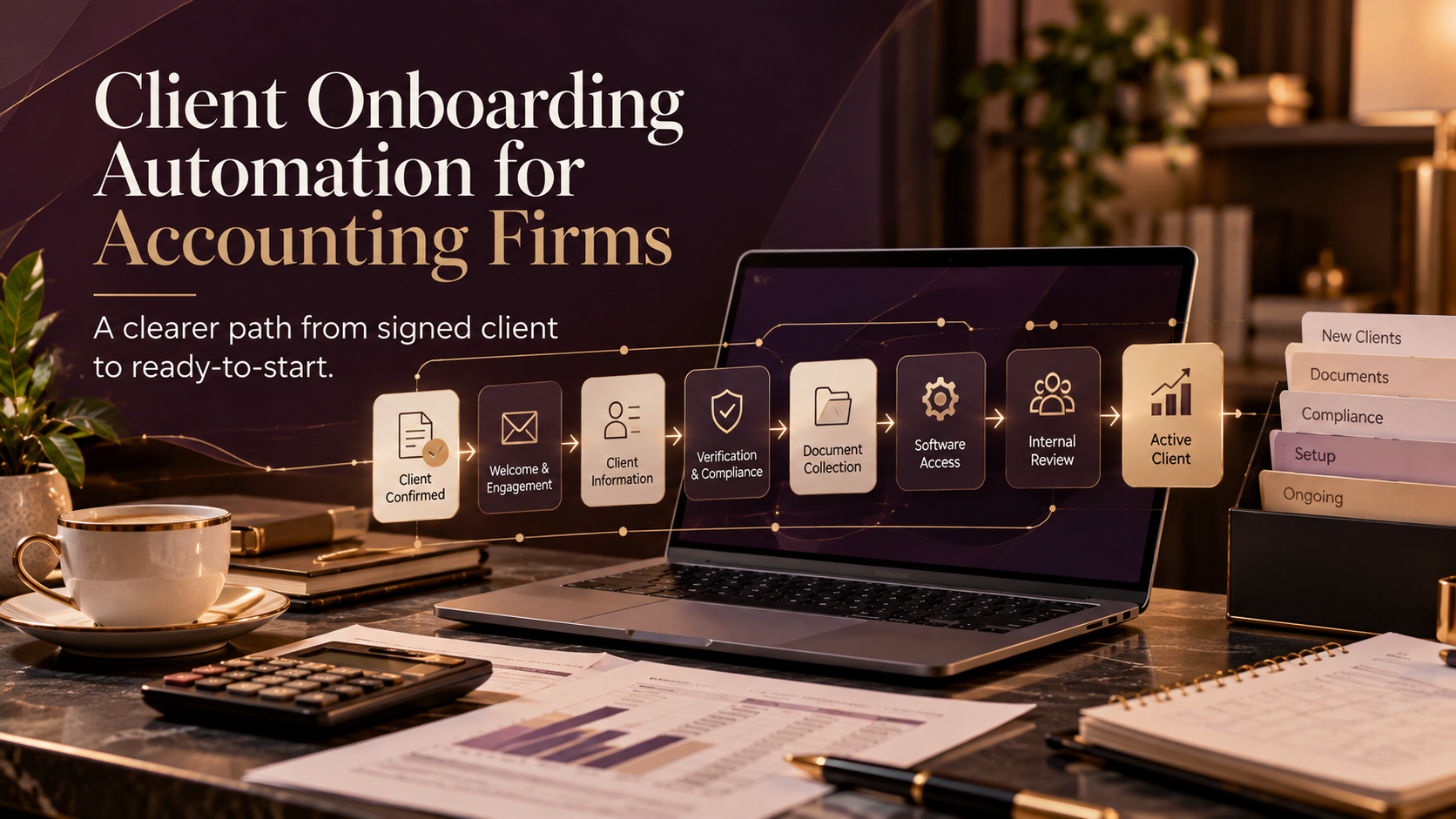
Client onboarding automation for an accounting firm should make the transition from new client to ready-for-service clear and consistent. A good workflow can update the CRM, send a welcome message, collect required information, route identity or compliance steps into the firm’s approved process, request documents, create internal tasks, send reminders, and tell the team when the client is ready to begin.
The goal is not to automate the relationship.
It is to automate the repetitive coordination around it.
For accounting firms, onboarding can involve a lot of small steps.
Engagement documents.
Client information.
Company details.
Accounting-software access.
Documents.
Compliance checks where required.
Deadlines.
Internal assignments.
And usually a lot of:
Just following up on the information we still need.
Automation can make that process much clearer.
Where should accounting client onboarding begin?
Your workflow needs a reliable trigger.
Something should tell the system:
This prospect is now a client.
That trigger might be:
- Engagement accepted
- Engagement letter signed
- Initial payment received
- Deal moved to Closed Won
- Manual approval
Once that happens, update the CRM.
For example:
Lifecycle stage: Client
Client status: Onboarding
Service: Monthly Bookkeeping
Owner: Assigned accountant
Onboarding started: Date
Now the rest of the system has context.
1. Remove the client from sales communication
Once someone becomes a client, they should no longer receive:
- Lead nurture
- Proposal reminders
- Discovery-call promotions
- Prospect campaigns
The CRM stage should control that transition.
2. Send a clear welcome email
A new accounting client usually wants to know:
What happens now?
What do you need from me?
Who am I working with?
Where do I send documents?
When will work start?
The welcome email should give them one clear next action.
Do not overwhelm them with twenty instructions at once.
3. Collect client information in a structured way
Depending on the engagement, you may need:
Business details
- Legal business name
- Company number
- Business address
- Directors or owners
- Financial year end
Service information
- Services required
- Current accounting software
- Payroll requirements
- Bookkeeping status
- Existing accountant
- Important deadlines
Operational information
- Main contact
- Finance contact
- Document approver
- Preferred communication method
Only ask questions you actually need.
Use conditional fields where possible.
4. Route compliance steps into the approved process
Depending on the jurisdiction and service, firms may have identity, KYC, AML, or other compliance requirements.
Automation can help with:
- Triggering the approved process
- Sending secure links
- Tracking completion
- Creating reminders
- Notifying the responsible person
But the professional or regulatory decision should stay within the firm’s approved compliance process.
Automation supports the process.
It should not replace professional judgment.
5. Request documents through one clear process
This is where onboarding often gets messy.
A few documents arrive by email.
One arrives through WhatsApp.
Another is uploaded somewhere else.
A month later, the team realizes something important is missing.
A better onboarding process gives the client a clear method for submitting documents.
Depending on the service, those might include:
- Previous financial statements
- Tax returns
- Payroll records
- Bank statements
- Accounting exports
- Incorporation documents
- Bookkeeping records
The exact list should be relevant to the service.
6. Request software access properly
If the firm needs system access, give clear instructions.
Where possible, use:
- User invitations
- Accountant/adviser access
- Role-based permissions
- Secure portals
- Connected applications
Avoid requesting passwords through normal email.
Different services may require different access.
7. Create internal onboarding tasks
Automation can create tasks such as:
- Review engagement
- Review client information
- Complete compliance checks
- Confirm system access
- Review historical records
- Add deadlines
- Assign accountant
- Create client folder
- Prepare handover
Every task should have an owner.
Otherwise, you have simply automated the creation of another messy task list.
8. Route onboarding based on service
Different accounting services need different onboarding journeys.
Bookkeeping
May need accounting-platform access, bank feeds, document workflow, and existing records.
Payroll
May need employee information, payroll schedules, previous payroll records, and approval procedures.
Annual accounts or tax
May need historical accounts, tax information, company records, and year-end details.
Advisory
May need management accounts, forecasts, historical financials, and business objectives.
Service-based routing helps you avoid asking every client the same questions.
9. Automate reminders carefully
A useful reminder flow might look like:
Welcome sent → Client information requested → Documents requested
↓
Human follow-up task ← Reminder 2 ← Reminder 1
↓
Required items complete → Internal review → Ready to start
This makes document chasing more consistent without allowing the automation to chase the client forever.
After one or two reminders, a person should usually step in.
10. Define when onboarding is complete
Onboarding should have a clear finish.
For example:
Engagement accepted → Information complete → Compliance complete
↓
Internal handoff ← Access complete ← Documents complete
↓
Client status: Active → Service owner notified → Ongoing client journey
Now both the team and the client know the relationship has moved into service delivery.
What should the CRM track?
Useful fields might include:
Client status: Onboarding / Active / Waiting on Client / Paused
Service: Bookkeeping / Accounts / Payroll / Advisory / Tax
Engagement accepted: Yes / No
Client information: Pending / Complete
Compliance: Pending / Complete / Review Required
Documents: Pending / Partial / Complete
Software access: Pending / Complete
Owner: Assigned team member
Target start date: Date
Onboarding completed: Date
This helps the team quickly answer:
Who is ready?
Who are we waiting on?
What is blocking the start?
A full accounting client onboarding workflow
Here is the version I would show visually in the blog:
Engagement accepted → Update CRM to Client / Onboarding → Stop prospect nurture
↓
Route by service ← Send client information form ← Send welcome email
↓
Request documents → Start approved verification process → Request system access
↓
Reminder 2 ← Reminder 1 ← Check missing items
↓
Create internal review → Confirm all requirements → Mark onboarding complete
↓
Active client journey ← Notify service owner ← Client status: Active
This feels much closer to how an actual automation is mapped.
What This Can Look Like in a CRM
A workflow like this can be built visually inside a CRM or automation platform, with each step triggered by the client’s actions, status, and onboarding progress.
The exact workflow will vary by firm and service, but the principle stays the same: automate the repeatable coordination, track what is still outstanding, and bring a person in when judgment or client support is needed.
What should remain human?
Keep people involved when judgment matters.
Especially:
- Scope changes
- Complex compliance questions
- Sensitive client concerns
- Exceptions
- Relationship-building conversations
The goal is not:
Remove humans from onboarding.
It is:
Stop humans spending so much time on repetitive coordination.
Where should an accounting firm start?
Do not automate the whole practice at once.
Choose one service.
For example:
Monthly bookkeeping onboarding.
Map what happens from:
Client says yes
to:
We are ready to begin bookkeeping.
Then identify:
- Client actions
- Internal actions
- Owners
- Required information
- Repeated reminders
- Human decisions
- Completion point
Once that journey works, adapt the framework for another service.
Client onboarding automation should reduce chasing
For an accounting firm, automation is not only about saving time.
It is about making the beginning of the client relationship more predictable.
The client knows what is needed.
The team knows what is missing.
The CRM shows the status.
Reminders happen consistently.
Sensitive decisions stay with the right people.
And work begins with better information.
Related Services
If you’re looking to improve more than one part of the client journey, these Marvz Solutions services may also be relevant:
Automation Foundation
For businesses that need focused CRM and workflow automation to reduce repetitive work, improve follow-up, and connect key processes.
Explore Automation Services →
Client Journey System
For businesses that need a more connected system across inquiry, CRM, qualification, follow-up, onboarding, and ongoing client communication.
View Client Journey System →
Lifecycle Foundation
For businesses that need better segmentation, lifecycle communication, email automation, and CRM structure across the client relationship.
Explore Lifecycle Marketing →
Frequently Asked Questions
What should accounting client onboarding include?
It usually includes engagement confirmation, client information, applicable compliance steps, document collection, software access, internal task assignment, important dates, and a clear transition into active service.
Can accounting firms automate KYC or AML onboarding?
Automation can support an approved compliance process by triggering requests, tracking status, sending reminders, and notifying responsible staff. Regulatory decisions should remain within the firm’s approved process.
What should an accounting firm automate first?
Start with repetitive coordination such as welcome emails, information collection, document requests, reminders, internal notifications, and CRM updates.
Should every accounting client use the same onboarding workflow?
No. Bookkeeping, payroll, accounts, tax, and advisory engagements often require different information and access.
How many reminders should be automated?
One or two automated reminders followed by a human follow-up task is a practical starting point for many firms.